
What is Content health?
Content health gives you a quick, at-a-glance view of how well-maintained your content is. Instead of digging through folders to find what's outdated or incomplete, you get clear metrics that highlight the files needing attention - so you can keep your library fresh, findable, and on-brand.
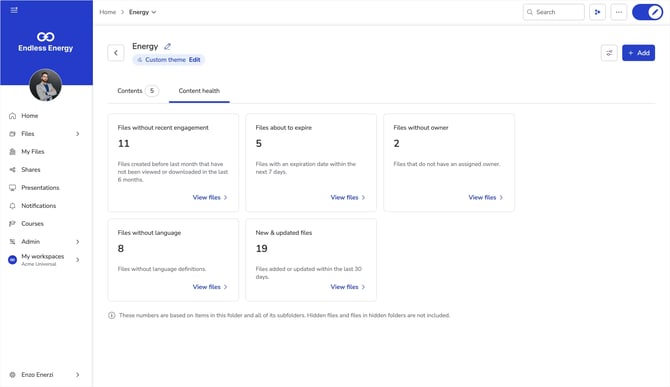
Content health shows you:
-
Files without recent engagement: Files created before last month that haven't been viewed or downloaded in the last 6 months
-
Files about to expire: Files with an expiration date within the next 7 days
-
Files without owner: Files that don't have an assigned owner
-
Files without language: Files without a language tag
-
New & updated files: Files added or updated within the last 30 days
Discover Content health
Content health lives right next to your content.
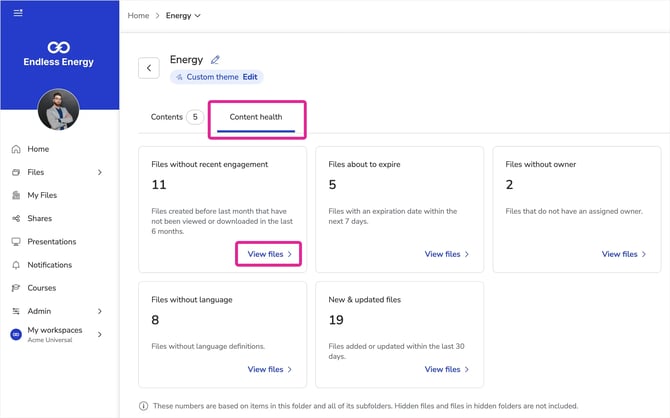
- In the Showell App for Web, turn on Edit mode
- Open Home, or open any folder of choice
- Home shows content health for your entire workspace. Open any folder to see metrics for just that folder and its subfolders.
- Select the Content health tab (next to Contents).
Each metric appears as a card. Click View files on any card to open the list of files behind it. From there you can select one or more files and take the relevant action (for example, assign an owner to files without an owner), or Export the list to work on it elsewhere.
💡 FAQ
Are hidden files included in the numbers?
No. Content health counts the items in the folder and all of its subfolders, but hidden files and files in hidden folders are not included.